Archiving solved the storage problem years ago.
But many organizations never solved the access problem.
Here’s the familiar pattern:
➡️ End user needs an old email
➡️IT becomes the middleman
➡️Time, productivity, and patience are lost
Now imagine a different model:
🌟 A secure, intuitive web interface where users can search archived email by sender, date, or content—and restore what they need directly to their mailbox.
Actionable takeaways:
1️⃣ Separate “data retention” from “data usability” in your strategy
2️⃣ Reduce IT bottlenecks by empowering end users safely
3️⃣ Look for archive tools that mirror modern search expectations
Archive Accelerator Enterprise Search flips the model—access without chaos for those using Arctera Enterprise Vault. To learn more and calm the chaos, visit: https://lnkd.in/dEPfT_e9
💬 Is your archive a resource… or a roadblock?
The Hidden Cost of “Just One Email.”
Most IT leaders don’t worry about email search.
Until one message becomes urgent.
A regulator asks for proof.
Legal needs context.
An exec swears, “It’s in the archive somewhere.”
Without the right approach, that “quick search” turns into IT tickets, delays, and risk exposure.
With a better approach, end users can securely search and restore archived messages themselves—without pulling IT into the weeds.
Actionable takeaways:
➡️ Audit how often IT is asked to retrieve archived email
➡️ Identify where delays introduce compliance or operational risk
➡️ Evaluate whether your archive is usable—or just stored
Modern archive access isn’t about storage.
It’s about speed, control, and confidence—with solutions for users of Arctera Enterprise Vault like our Archive Accelerator Enterprise Search.
💬 Where does archived email slow your teams down today?
If you’re ready to speed things up, we’re happy to help!
Archiving Data from Exchange Online
For many customers that currently have an email archiving system in place, such as VeritasTM Enterprise Vault, they often decide to discontinue mailbox archiving when they migrate to Exchange Online (Office 365). One reason is that Exchange Online has mailboxes that typically come with a 100 GB size limit.
If they still have a need for journaled copies of all emails for compliance reasons, they may decide to archive that data, but use SMTP archiving with Enterprise Vault. They can do that on premises or use a managed solution such as bluesource’s EV247.
But even with that, there are some use cases where they still need to archive data directly from the mailboxes in Exchange Online.
- Voicemail
- Calendar items
- Moving away from Exchange Online Archive mailboxes
- Dis-satisfaction with Office 365 eDiscovery and Compliance tools
Let’s talk about points 1 and 2… voicemail and calendar items.
For voicemail, let’s take a real-world case study. We have a customer, a state government here in the US, that was using a combination of journaling with Enterprise Vault and mailbox archiving. They migrated their mailboxes to Office 365 and switched to SMTP archiving. They still use Enterprise Vault on premises, and Exchange Online sends all copies of messages sent and received to an SMTP address that is picked up by Enterprise Vault on premises.
They have a regulatory need to respond to Freedom of Information Act (FOIA) requests, and as part of that requirement, they must make voice message available for request. Their voice mail system is Cisco Unity Connection which puts copies of voice message in users’ mailboxes. In the past, when the customer used Enterprise Vault Mailbox Archiving, these voice messages ended up in the archives so they were available for FOIA requests. However, Enterprise Vault does not support mailbox archiving from Exchange Online, which left them in a bit of a bind when it came to the voice messages, which don’t go through the journaling process.
To meet this demand, we’ve built the functionality into our software, Archive Accelerator, which will be shipping this month. This new functionality addresses Calendar Items as well, which also escape the journaling process and as a result aren’t found in the SMTP archives. As more and more customers come to us with the need to archive data directly from Office 365 for a variety of reasons, we’re committed to investing in enhancing this functionality and accessibility.
If you are currently finding similar challenges in archiving to meet your needs, let us know! We’re happy to help!
Stay safe!
SMTP Archiving: How Much Can You Save?
Have you considered using SMTP Archiving with Enterprise Vault?
These days, we all have incredible amounts of data to store, recall, protect, or otherwise maintain. Emails. So. Many. Emails.
That’s fine, once you figure out how to keep all those emails safe, secure, and easily recoverable. But then you look at the price tag that comes along with email archiving. Between servers and software, and storage, the numbers can be daunting.
Increasingly companies are deciding to preserve their email for legal and compliance reasons using an archiving product such as Veritas Enterprise VaultTM, which has been the industry leading solution for 13 years.
New deployments of Enterprise Vault are typically architected to use SMTP archiving, which is much more efficient than the traditional ‘Journal’ archiving. According to the Enterprise Vault 12 – Performance Guide, using the ‘old’ way of journaling email from Exchange journal mailboxes, a 16 core server can archive 45,000 messages per hour. However, by using the new SMTP archiving process, the same server can archive 165,000 messages per hour – a 267% increase in performance!
As an added benefit, the amount of storage space required for a full index of SMTP data is only 9%, compared to 13% for the indexing of Exchange Journal mailboxes (as we did in the “old days”). That is about a 30% decrease in the amount of storage needed for the index.
That is a great way to deploy a new EV environment with significantly fewer resources required for journaling, but what about mailbox archiving? That still works the same way, and a rule of thumb is to use 1 Enterprise Vault Mailbox Archiving server for each 5,000 mailboxes to be archived.
However, using our new Archive Accelerator Enterprise Search application, mailbox archiving is achieved with typically 1 server per 20,000 mailboxes. In addition, the storage needed is reduced by using the SMTP archiving options, rather than required separate mailbox archives.
Here is a graphic to show savings for a sample company:
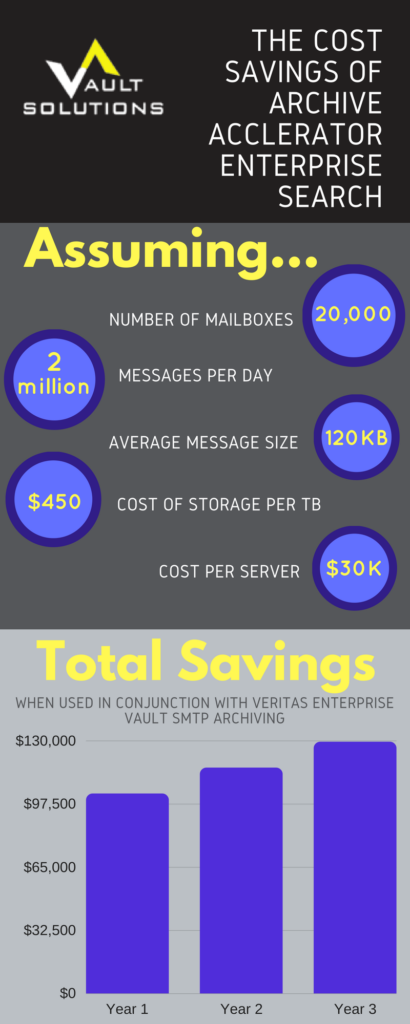
Don’t lose sight of one important factor here – cost savings could be greater or less based on the number of mailboxes, existing storage costs, and other expenses incurred with your current archiving set up.
We’d be happy to work with you to discover what your savings would be with this new architecture. Contact us today to see for yourself!
Maximizing Veritas’ Enterprise Vault with Archive Accelerator Enterprise Search

Is your company governed by regulations that require you to maintain your data archives on servers located physically in your country? Do you prefer to have a physical data center hosting your archived information? Do you want the full benefit of having Enterprise Vault on premises, but aren’t sure how feasible it is in your situation? Maximizing Veritas’ Enterprise Vault to these ends is possible!
All of these are concrete reasons why you might be searching for the perfect data archiving solution, and all speak to cost efficiency in some regard. Truth of the matter is, it can be done efficiently and economically!
Let’s look at a fictional example for an organization we’ll call Wonka’s Bank. Just like one of our real customers, Wonka’s Bank is looking at two options to maximize their Veritas Enterprise VaultTM deployment. They could deploy four Enterprise Vault SMTP journal servers, twelve Enterprise Vault Mailbox Archiving servers, and the licenses on-prem. They would be using the traditional method of journal archiving.
The other option for Wonka’s Bank is to work with a third party data center to host Enterprise Vault. The data center will host four Enterprise Vault SMTP journal servers and two Archive Accelerator servers. Vault Solutions’ Archive Accelerator Enterprise Search will be staged on the two Archive Accelerator servers. This model allows for journaling within Enterprise Vault rather than using the mailbox archiving servers. It also removes the requirement for space and hardware on premise.
Why the dramatic difference? Why is one option better than the other?
The first option is definitely more hardware heavy. This could become a space or cost issue. Cost effectiveness aside, there are other benefits to utilizing Vault Solutions’ Archive Accelerator Enterprise Search and a third-party data center that make the latter a stronger option. This is especially so in Wonka’s case, as they want to keep their data relatively local. In addition to cost effectiveness and maintaining their data in their country, they also get the benefit of a rich eDiscovery and compliance solution with Enterprise Vault on premises, including Compliance Accelerator with its new machine learning capabilities.
For more on how Archive Accelerator Enterprise Search can enhance your deployment of Veritas’ Enterprise Vault, see our data sheet, or email info@vault-solutions.com today!